


Use marketplace connectors
Browse the connector marketplace and attach connectors or actor filters to the tasks in your diagram.
In Bonita Process Designer you can enrich the tasks of a diagram with extensions from the Bonita marketplace — the same Connectors and Actor Filters you use in Bonita Studio. Attaching an extension records, on a task, which connector or actor filter it should use. The binding is saved with the diagram and shown on the canvas.
Browse the connector marketplace
The marketplace catalogue is fetched from the Bonita marketplace and cached, so browsing stays fast and keeps working even when the catalogue source is temporarily unreachable (the last cached catalogue is served).
To browse and attach an extension:
-
Open the diagram in the editor and select the task you want to configure.
-
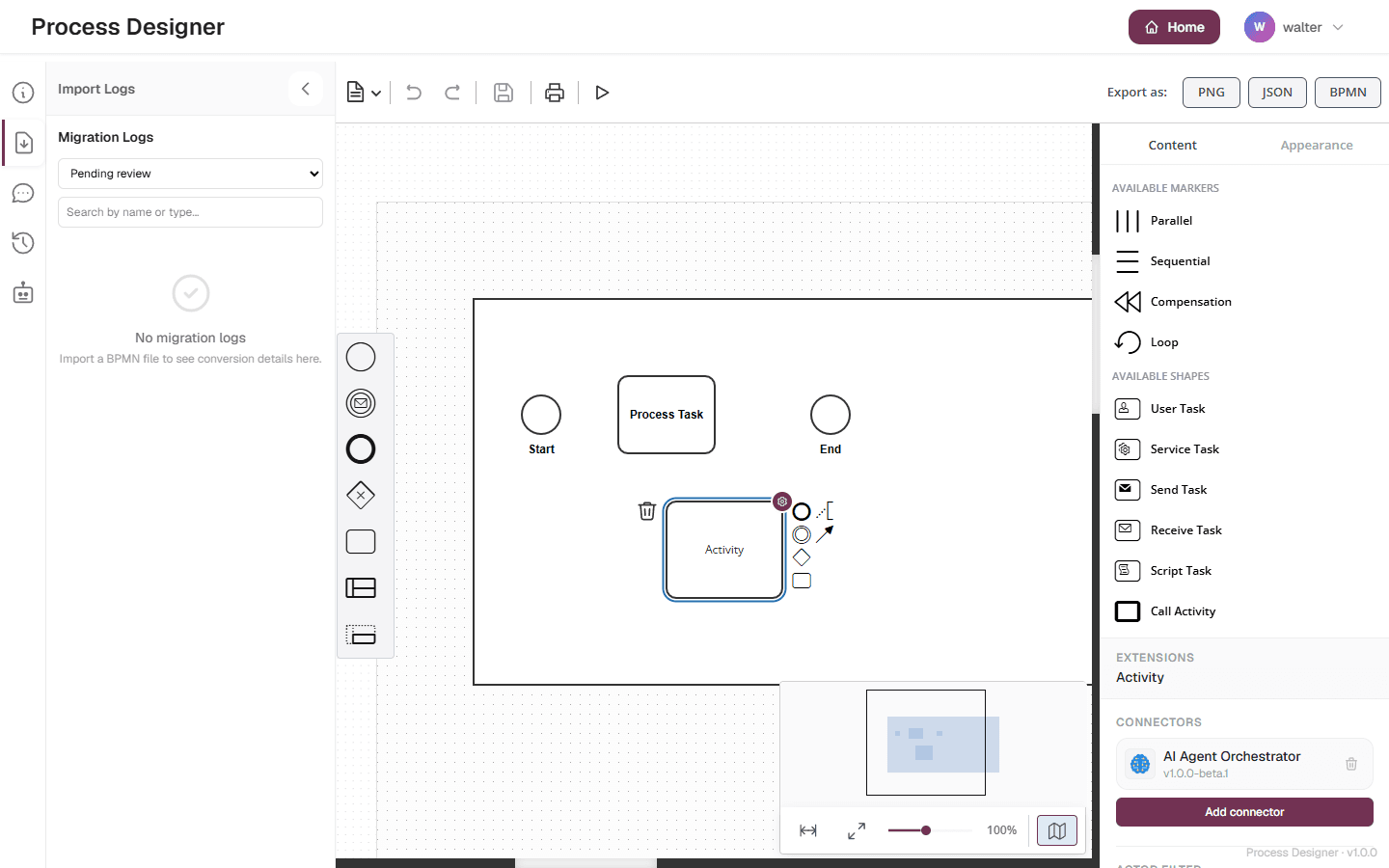
In the inspector panel on the right, open the marketplace section for the task.
-
Filter the catalogue by type — Connector or Actor filter — and pick the extension you need.
-
Confirm the attachment.
The attachment is saved immediately, and the inspector shows the extension, with its icon, on the task. A small badge also appears on the task in the canvas, so you can see at a glance which tasks carry a binding.
|
Browsing and attaching extensions requires edit access to the diagram. Readers can view a diagram but cannot attach, change, or remove extensions. |
Connectors and actor filters
Two kinds of extension can be attached to a task:
-
Connectors integrate a task with an external system (for example, sending an email or calling a service). A task can carry several connectors.
-
Actor filters refine who is assigned a human task. Actor filters apply only to User tasks, and a task can carry at most one actor filter.
If you try to add a second actor filter to a task that already has one, the editor does not allow it — remove or replace the existing one instead.
What happens when you export
When you export the diagram to BPMN 2.0 XML, the diagram structure — tasks, events, gateways, pools, lanes and flows — is exported in a format that Bonita Studio imports cleanly.
Connector and actor-filter bindings are written into the exported .bpmn file as Bonita extension elements, so they travel with the process. If you export a diagram and re-import it into Bonita Process Designer, the bindings are preserved — a round trip through the application keeps them intact.
|
Bonita Studio currently ignores these custom bindings when it imports the |
Related pages
-
Edit a diagram — select tasks and use the inspector panel.
-
Supported BPMN elements — which task types are available.
-
Export and import diagrams — export to BPMN, PNG and JSON, and import BPMN XML or JSON.