


Manage the license
How Bonita Process Designer enforces its license, how to activate or renew a license, and what happens when the license is missing, invalid, or expired.
Bonita Process Designer is a licensed product. A license gate protects access to the application. Until a valid license is present, the application blocks access and sends every user, whatever their role, to the license page. An Admin activates the license there.
|
Only an Admin can activate a license. See Roles and permissions. |
How the license gate works
Every request to Bonita Process Designer passes through the license gate before it reaches the application. The gate checks that a valid license is in place:
-
If the license is valid, the request continues normally and the application is fully usable.
-
If the license is missing, invalid, or expired, the request is rejected with an HTTP
402 Payment Requiredresponse, and the user interface sends the user to the license page.
The stored license is checked at startup and re-checked periodically while the application runs, so an expiry is detected without requiring a restart. These checks are local: they read the license stored with the installation and do not need outbound internet access.
A few functions stay available while the license is not valid, so that an Admin can sign in, activate a license, and ask for help. Among them: signing in and out, the license page itself, and the diagnostic archive.
What each role sees on the license page
-
An Admin sees the License Activation page: the request key and the license file upload area.
-
A Creator or a Reader sees License Not Active, with the message "This application does not have a valid license. Please contact your administrator to activate it." They cannot upload a license.
The details that identify the license — the customer name, the license type, the expiry date, the host name and the operating system it is bound to — are returned to Admins only. Creators and Readers only learn whether the license is valid.
Activate a license
When Bonita Process Designer starts without a valid license, an Admin is sent to the license activation page.
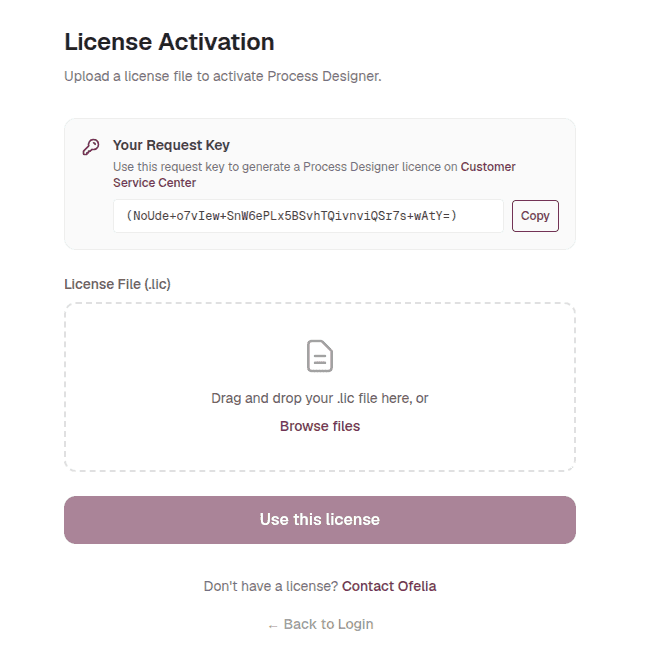
Activation takes three steps:
-
Copy the request key displayed on the page. This key identifies your installation, and Ofelia needs it to issue a license for it.
-
Generate a license for that request key on the Customer Service Center, and download the resulting
.licfile. -
Upload the
.licfile on the activation page, then select Use this license.
The license is validated as soon as it is uploaded. The uploaded file replaces any license file already installed, whether or not it is accepted. If it is accepted, the gate stops redirecting, and the application becomes available to all users according to their roles and permissions. If it is rejected, the page reports the reason and the application stays blocked.
Renew a license
To renew an expired license, repeat the same three steps: the new license file replaces the stored one.
The license page is available only while the license is not valid: while a valid license is installed, opening it takes you back to Home. The application therefore offers no screen to install a renewal in advance, and if you wait for the expiry to upload the new file, the application is blocked for every user in between.
Install a renewal before the current license expires
Contact Support on the Customer Service Center well before the expiry date to get the renewal file for this installation. The operator then installs it directly in the license folder, without a restart:
-
Find the license folder:
-
Standalone: by default, the
licensesfolder next toapp.jar;BONITA_LICENSE_FOLDERinconfig.envchanges it. -
Docker:
/opt/bonita/licensesin theappcontainer, kept in thebonita_licensesvolume.
-
-
List the folder and keep a copy of the installed license file outside the license folder, under a name that ends with
.lic, so that you can upload it if the renewal is rejected. If the folder holds more than one.licfile, back up and remove the others as well: an older file that is still valid would otherwise hide a rejected renewal until that older file expires. For example, in the Docker distribution, list the folder, then use the name you found:docker compose exec app ls /opt/bonita/licenses docker compose cp app:/opt/bonita/licenses/bonita-process-designer.lic ./license-backup.lic -
Copy the new file into the folder under a temporary name that does not end with
.lic, then rename it over the installed file, so that the folder holds only the new license and is never read half-written. In the Docker distribution:docker compose cp renewal.lic app:/opt/bonita/licenses/renewal.tmp docker compose exec app mv /opt/bonita/licenses/renewal.tmp /opt/bonita/licenses/bonita-process-designer.licIn the standalone distribution on Windows, File Explorer and
rendo not replace an existing file. Do not delete the old file first: open a Command Prompt in the license folder and runmove /Y renewal.tmp bonita-process-designer.lic. On Linux, runmv renewal.tmp bonita-process-designer.licin the license folder.
The application checks the license again at the first request after its five-minute cache expires, and reads the license folder at that check. The new license is therefore in use within about five minutes while the application is in use; restarting the application takes it into account immediately. More than five minutes later, open Bonita Process Designer: if you are sent to the license page, the renewal was rejected, and uploading the backup copy there restores access at once. If anything is unclear, contact Support on the Customer Service Center before the current license expires.
|
A license is bound to the host it was issued for. It cannot be moved to another machine, so a license file is only ever accepted by the installation whose request key produced it. Plan for this when you move Bonita Process Designer to new hardware, rebuild a host, or set up a second environment: each host needs its own license, generated from its own request key. Request the new license before you decommission the old host, otherwise the new installation stays blocked until the license arrives. |
What happens when the license is invalid or expired
When no valid license is in place, the license gate blocks the application:
-
Requests receive a
402 Payment Requiredresponse, except the few functions listed in How the license gate works. -
Users cannot view, create, or edit diagrams.
-
Every user is sent to the license page: an Admin to activate or renew the license, a Creator or a Reader to the License Not Active notice.
Restore access by activating a current license. As soon as a valid license is recorded, normal access resumes for every user.