


Bonita Process Designer
Bonita Process Designer is a web-based BPMN 2.0 editor for creating, organizing, generating, collaborating on, and exporting business-process diagrams.
|
This is the documentation for Bonita Process Designer 1.1. See the release notes for what is included in this release, and Upgrade Process Designer to move an installation from 1.0.x to 1.1. |
What is Bonita Process Designer?
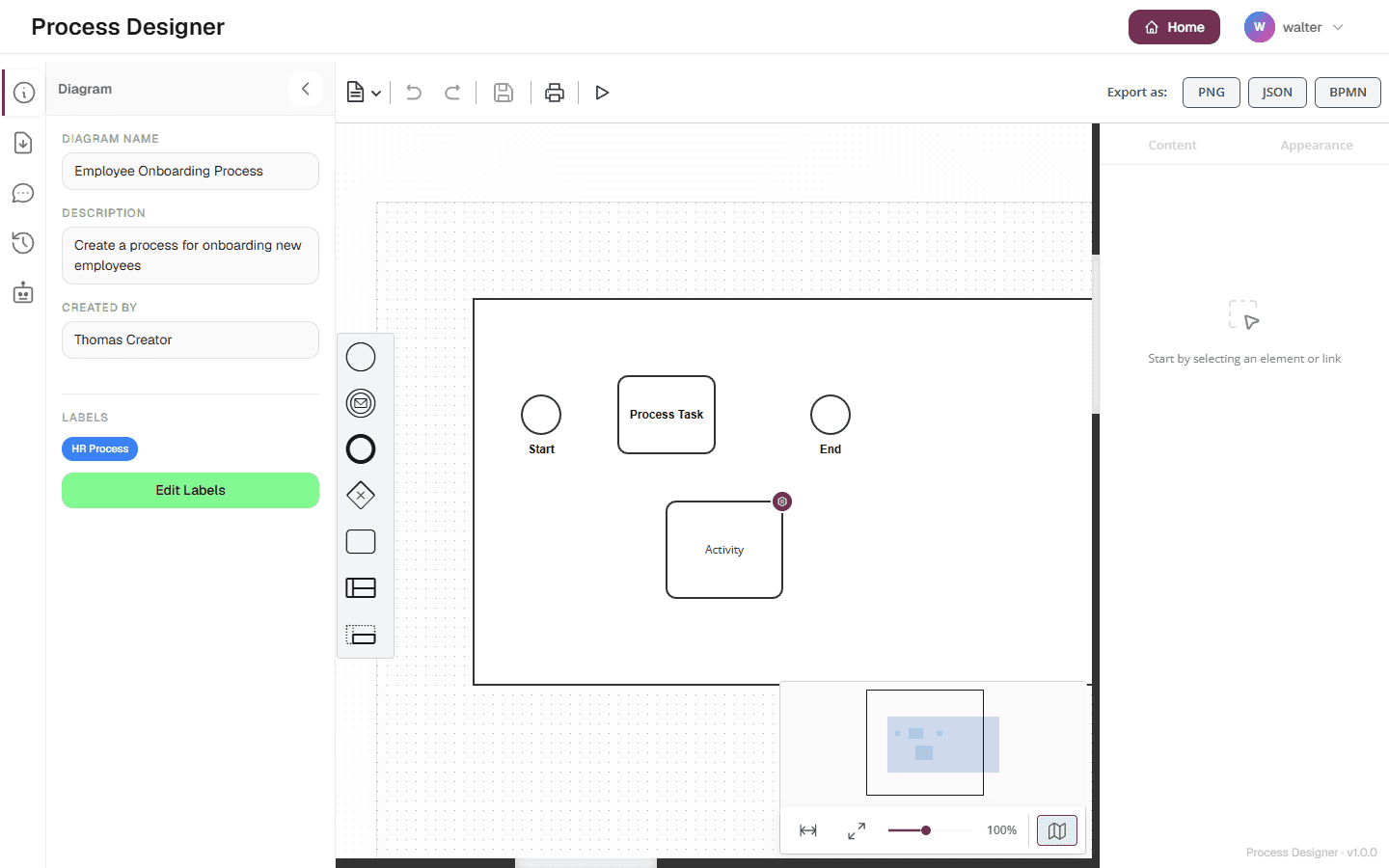
Bonita Process Designer is a web-based editor for BPMN 2.0 business-process diagrams. You work entirely in your browser: build diagrams on a drag-and-drop canvas, file them in folders, make one process call another, generate a first draft from a plain-language description using AI, co-edit with your team in real time, and export the result for use in Bonita Studio.
It is designed for enterprise use, with role-based access control scoped to groups, real-time collaboration, license management, a diagnostic archive for Support, and opt-in product analytics.
Who is it for?
-
Process designers create and refine diagrams, organize them in folders, draft processes quickly with AI, and export them for further development.
-
Reviewers and stakeholders view diagrams and add comments without changing them.
-
Administrators manage users, groups, labels, application settings, the AI quota, and the license, and download a diagnostic archive when they contact Support.
-
Operators install, configure and upgrade Bonita Process Designer with Docker, as a standalone distribution, or alongside a Bonita Runtime.
Access is governed by three roles — Admin, Creator, and Reader — and by the groups a user belongs to. A user only sees the diagrams and folders of their groups; an administrator sees everything. See Roles and permissions for the full rights matrix.
In Bonita Process Designer, "diagram" and "process" mean the same thing.
Key capabilities
- Visual BPMN editing
-
Drag shapes from the palette onto the canvas, choose their exact type in the inspector, connect them with sequence flows, including conditional and default flows, and organize work into pools and lanes. The editor offers a curated set of BPMN elements that import cleanly into Bonita Studio. Your work is saved automatically, and you can save it at any moment. See Edit a diagram and Supported BPMN elements.
- Folders and the process tree
-
File each process in exactly one place: at Home, the top level, in a folder, or under another process. The home page shows one level at a time, with a breadcrumb and a folder address you can bookmark or share. Every card and search result shows the process’s filing path, and the Tree view shows the processes filed under others. Creators and Admins move processes one at a time or several at once, and titles no longer have to be unique. See Organize processes in folders and Browse the process tree.
- Called processes and document tabs
-
Point a Call Activity at another process of Bonita Process Designer. Anyone who can open the diagram, Readers included, can open the called process in a document tab, and come back to the calling diagram as they left it. Deleting a process lists the processes that call it. See Call other processes.
- Export to Bonita Studio, including BPMN+
-
Export a diagram to Studio-compatible BPMN 2.0 with BPMN, or export a process together with the processes filed under it, as one file, with BPMN+. You can also export to PNG or JSON, print, and import BPMN or JSON files: the Import Logs tab then lists the elements the import converted, removed or could not import. See Export and import diagrams and Export a diagram to Bonita Studio.
- Real-time collaboration
-
Several people can edit the same diagram at once. Changes are synchronized through the server, and you see the presence and cursors of the other participants. While an AI request changes the diagram, the other participants are paused until it finishes. See Collaborate in real time.
- AI diagram generation
-
Describe a process in plain language and let Bonita Process Designer generate a starting diagram, then ask the AI to modify or analyze it. Requests run as background jobs, which pick up again when you reload the page in the same browser, and each group can have a quota. See AI diagram generation.
- Versioning
-
Each time the server stores a diagram, a few seconds after editing stops or when an AI result is applied, an Auto version can be recorded, and Creators and Admins take named snapshots. Anyone who can open the diagram can view and download its versions; Creators and Admins restore a version as a new diagram, filed like the original. See Version your diagrams.
- Comments, labels and simulation
-
Discuss a diagram in its comment thread, tag diagrams with shared labels, and run a token through a diagram to check its flow. See Comment on diagrams, Organize diagrams with labels and Simulate a process.
- Administration and support
-
Admins manage users, groups, labels, settings and the AI quota from the admin panel, and the license from the license page. The Support tab of the admin panel downloads a diagnostic archive that describes the instance for the Support team — without passwords, diagrams or AI prompts. While the license is not valid, the archive can still be downloaded, from its own address: see Download the archive when the license is not valid. See Administration, Download a diagnostic archive and Get support.