


Version your diagrams
How Bonita Process Designer records versions of a diagram automatically and on demand, and how to view, download and restore a version from the Versions tab of the editor.
Bonita Process Designer keeps a history of each diagram. Versions are recorded automatically as the diagram is saved, and you can take a named snapshot at any moment. From the history you can download any version, or restore it as a new diagram. There is a single, shared working copy of each diagram: versions are a history to return to, not drafts to publish.
Open the Versions tab
-
Open the diagram in the editor.
-
In the bar on the far left of the editor, click the Versions icon.
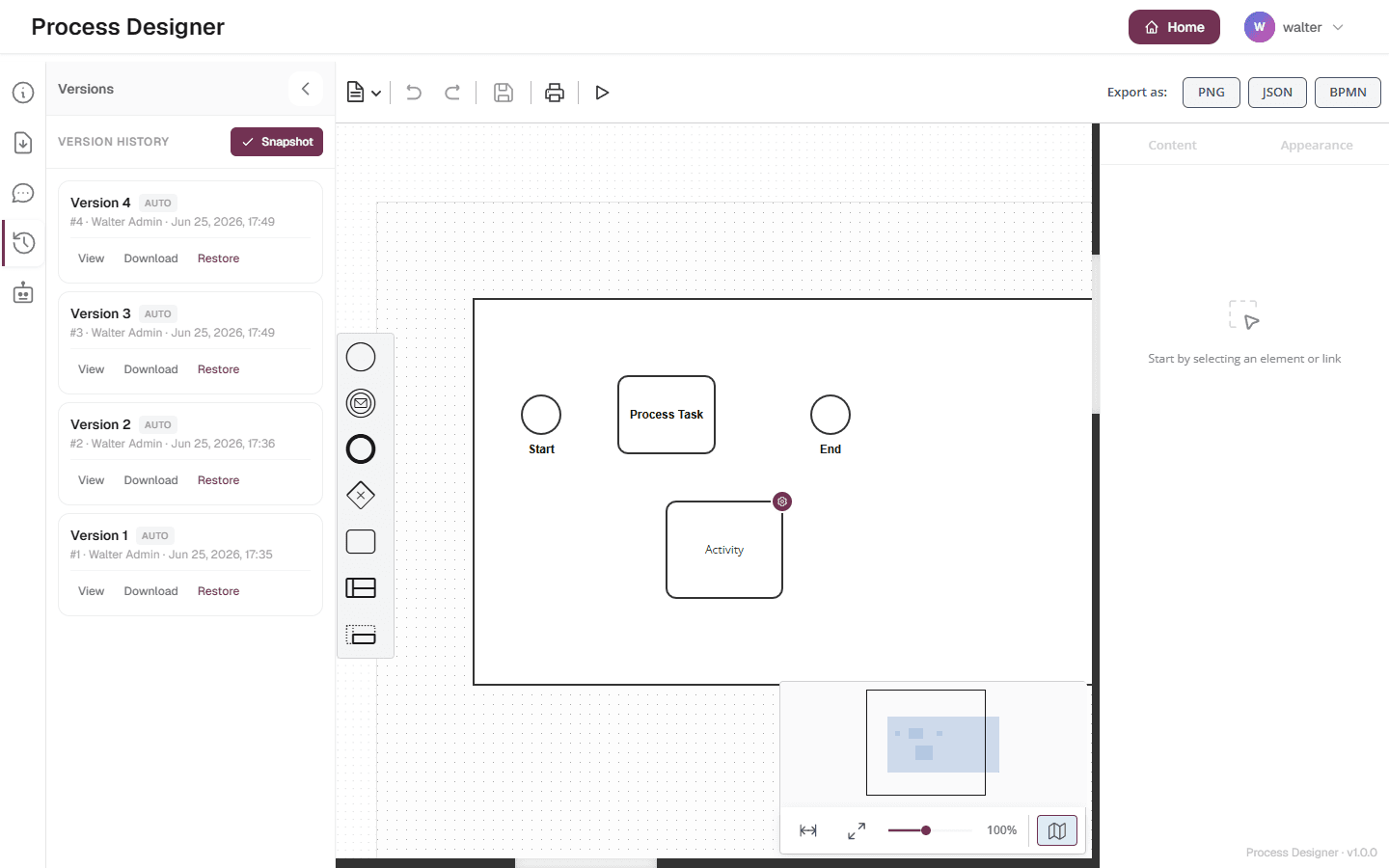
The Versions tab lists the versions of the diagram, newest first, under Version History. Each entry shows:
-
its title: the snapshot name when it has one, otherwise Version followed by its number;
-
a badge, Auto or Manual, telling how it was created;
-
its number, the person who saved it, and the date and time. For a version recorded from live editing, that person is the last one who changed the diagram.
A diagram that has never been saved shows No versions yet and Save the diagram to create the first version.
Auto and Manual versions
| Kind | When it is created |
|---|---|
Auto |
Each time the diagram is stored on the server. That happens a few seconds after you stop editing, when an AI Generate or Modify result is applied, and when you change the diagram’s details such as its name or labels. Save and autosave create one only if your latest changes had not been stored yet: saving an unchanged diagram adds no version. |
Manual |
When a Creator or an Admin clicks Snapshot. |
By default, every store of the diagram creates an Auto version. The person who installs Bonita Process Designer can make Auto versions less frequent with a server setting, so that only one store in every few creates one; the version numbers then have gaps. Manual snapshots are never skipped.
Take a snapshot
A snapshot records the diagram as it is now, with a name of your choice, so that you can find that state again easily.
-
Open the Versions tab.
-
Click Snapshot.
-
In the Create a snapshot dialog, type a name, for example
v1 - initial draft, or leave it empty. -
Click Snapshot.
The message Snapshot created. confirms it, and the new Manual version appears at the top of the list, under its name.
|
A snapshot records the diagram as last stored on the server. If you have just made changes, save first. |
View, download and restore a version
Each version offers these actions:
-
View — shows the version’s details: its number, Saved by, Saved at and its notes, if any.
-
Download — downloads the content of that version as a JSON file named
diagram-<id>-v<number>.json. -
Restore — creates a new diagram from that version (Creators and Admins only).
No version shows a preview. To see the content of a version, download it, or restore it: the restored copy is a separate diagram, which you can delete afterwards.
Restore a version
Restoring never changes the diagram you are working on.
-
In the Versions tab, find the version you want.
-
Click Restore.
-
Confirm in the Restore this version? dialog, which reads:
This creates a new draft diagram from version <number>. The current diagram is left unchanged.
The dialog calls it a draft: it is an ordinary diagram. Bonita Process Designer creates it from the content of that version, shows Version restored as a new draft diagram., and opens it:
-
In a document tab, the restored diagram opens in a new tab.
-
In the first tab, it replaces the page and closes the other tabs, without asking about unsaved changes. Save every open tab first.
The new diagram:
-
is named after the original with the version number, for example
Expense Claim (restored v4); -
belongs to the same group and carries the same labels as the original diagram has now;
-
is filed in the same place as the original: in the same folder, under the same process, or at Home. If that place is no longer available, the new diagram is filed at Home;
-
is created by you, and starts with an empty version history of its own;
-
is not called by any process: Call Activities that call the original diagram keep calling the original, not the restored copy.
The original diagram and its versions are left exactly as they were. The new diagram is an ordinary diagram: rename it, move it or delete it as you would any other.
Who can do what
| Action | Reader | Creator | Admin |
|---|---|---|---|
See the version history |
Yes |
Yes |
Yes |
View and download a version |
Yes |
Yes |
Yes |
Take a snapshot |
No |
Yes |
Yes |
Restore a version as a new diagram |
No |
Yes |
Yes |
Everyone acts only on diagrams they can open: the diagrams of their groups, or every diagram for an Admin. A version cannot be deleted on its own, by anyone. Deleting a diagram deletes all its versions.
While another user’s AI request is changing the diagram, Snapshot is refused with AI is editing this diagram. Your changes cannot be saved right now. Try again once it has finished.
Known limitation: connector attachments are not versioned
Marketplace connectors and actor filters attached to service tasks are tracked against the current diagram, not against individual versions. A version records the BPMN structure and layout, but not the connector attachments. Check the attachments of a restored diagram and attach them again if needed. For how attachments work, see Use marketplace connectors.